Scorecard
Queue scorecard
Half scorecard, half waiting list. It shows the court and the queue behind it, because in queue modes the next players matter as much as the current score.
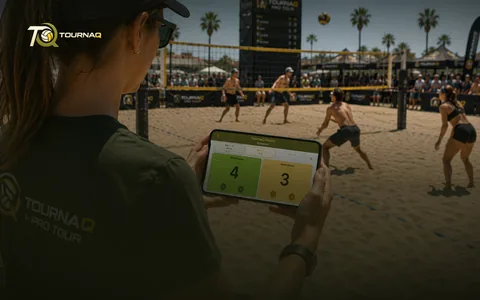 Scorecards
What it does
The queue, liveWho is on, who is admin, when the handover is, and who is up next to challenge — laid out to match the assignment mode you chose.
Score court pointsCount what the side on court is making.
Eject challengersManually, or automatically once they have conceded enough.
Eject court teamsManually, or automatically when they win the game or concede too much.
Game timerThe round runs to a hard time limit.
Used by
Royal Shuffles, Royal Rotations, Doghouse Shuffles and Royal Duos.
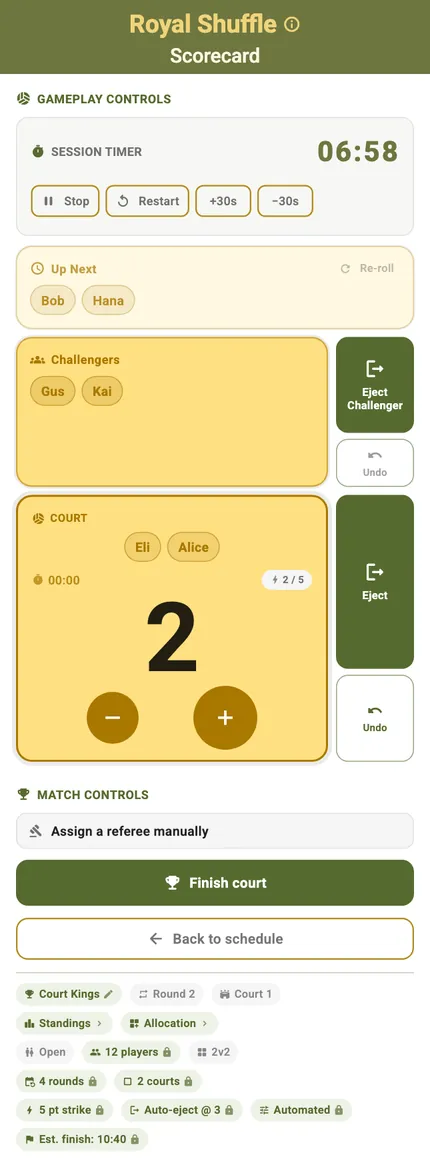
The card, top to bottom
Read it from the bottom up and it is a queue: the side on court with the score under their names, the challengers waiting above them, and Up Next above that. The eject buttons sit down the right edge, within thumb reach of the score, because ejecting is the other thing you do all round.
Every control on the card
The queue card, top to bottom
ControlWhat it doesWhen you see it
The pill row
What it doesThe same pills the tournament page carries, plus this round and this court. The format pills edit here only on a single-court session; on more than one they lock, because every court feeds one shared ranking.
When you see itUnder the title
Court
What it doesWho is holding the court right now, and the points they have made this turn.
When you see itAlways
Challengers
What it doesThe side waiting to come on next.
When you see itAlways — “Waiting for players…” while the queue is too thin
Up Next
What it doesThe stage behind the challengers, with “Re-roll” to draw a different pairing.
When you see itAutomatic assignment — “Not enough players in queue.” when there is nobody left to draw
Score buttons
What it doesCount the points the side on court is making.
When you see itAlways
Session timer
What it doesThe round’s countdown, with Stop, Resume and Start / Restart.
When you see itAlways
Eject
What it doesSends the side off and brings the next one on. “Eject / Challenger” where the prompt can rotate a challenger instead.
When you see itAlways — manual ejection stays available whatever the automatic thresholds say
Automatic eject prompts
What it doesThe mode’s own threshold fires and offers “Eject Team” — a strike, an escape, or a loss limit reached.
When you see itWhen that threshold is set above zero
Undo
What it doesTakes the last step back. With points already on the board it asks first: “The team currently on court has {points} point(s) recorded. Undoing will discard them.”
When you see itAfter an ejection, and during a manual pick
Change referee
What it does“Select who referees this court. The current one returns to the queue.” The successor is suggested from the current court team.
When you see itAuto-Allplay, where a rotating referee keeps score
Player pills
What it doesSend someone on a break — their seat becomes a Placeholder — and tap the stand-in to bring them back.
When you see itWhile a later round can bring them back
Start / Finish court
What it does“Start Court” drops it into live play; “Finish court” asks “Record this court’s results now and end its round.” and is reversible with “Undo Finish”.
When you see itBottom of the card
App-bar QR menu
What it does“Export court” hands the whole court to another phone; “Manually Set Score” writes the results in directly.
When you see itWhile the court is live
Landscape
What it doesTurn the phone and the same controls rearrange for a net post or a side table.
When you see itAny time
What each mode does with it
What differs, mode by mode
ModeWhat is different hereThe full card, control by control
Royal Shuffles
What is different hereThe strike prompt ends a hold: “Game Won! {names} reached {points} points! They will be ejected and return to the queue.” The table under the card ranks individual players.
The full card, control by controlScoring a Royal Shuffle match
Royal Rotations
What is different herePairs queue instead of individuals, so the card adds a partner picker — “Pick a partner for the floater” — and the table under it ranks teams.
The full card, control by controlScoring a Royal Rotation match
Doghouse Shuffles
What is different hereTwo thresholds instead of one — “Escaped!” at the escape target, and “Ejected! {names} lost {count} games!” at the loss limit.
The full card, control by controlScoring a Doghouse Shuffle match
Royal Duos
What is different hereFixed pairs queue as one unit, so nothing on the card ever splits a duo — and there are no stand-ins: a duo sits the round out or leaves the tournament. The table under the card ranks duos.
The full card, control by controlScoring a Royal Duo match
Scoring it without this card
Two ways round the card
You cannot stand at every court, and a queue court runs whether you are watching or not. Both of these end in the same ranking the card would have produced.
Export courtHand the whole court to another phone as a QR code, the queue behind it included: in a queue mode a court, not a match, is what gets refereed.
Manually Set ScoreWrite the court’s results in directly, without scoring its games one by one.
Scoring it, mode by mode
Scoring a Royal Shuffle matchIndividuals queue, and the strike prompt ends a hold.Scoring a Royal Rotation matchPairs queue, redrawn each round — so the card adds a partner picker.Scoring a Royal Duo matchThe same card with the pairs fixed for the whole tournament.Scoring a Doghouse Shuffle matchTwo thresholds on the card instead of one: escape, and loss limit.

TournaQ Volley
The tournament engine — get the app